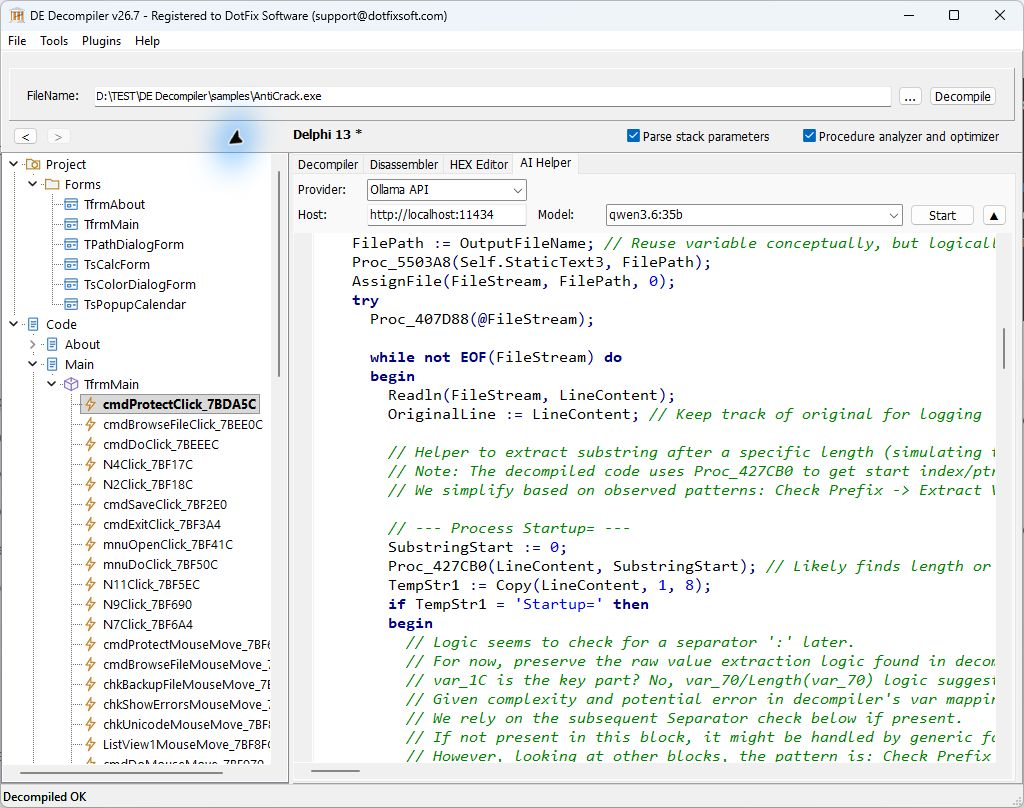
AI Helper
AI Helper can suggest clearer names and control flow for a decompiled Pascal listing. It is optional and included in commercial editions. Built-in decompilation works without an AI model.
Choose where the model runs
Local models with Ollama
Choose Ollama API, point Host at your Ollama instance and select an installed local model. With a local model and http://localhost:11434, the request stays on the workstation. An Ollama instance hosted by your organization processes it on that server.
Ollama can also reach its cloud through a local endpoint. For work that must stay within your own environment, use an installed local model and disable cloud features in Ollama.
OpenAI and DeepSeek APIs
Under OpenAI API, enter the provider’s base URL, your API key and the ID of a compatible model. Use https://api.openai.com/v1 for OpenAI or https://api.deepseek.com for DeepSeek. The provider bills API usage at its own rates, separately from your DE Decompiler license.
What the selected service receives
When you start AI Helper, it sends the complete reconstructed listing of the current procedure, including folded lines, the model instructions and the model ID to the configured endpoint. The request carries text only. The listing can still contain recovered strings and symbols.
OpenAI API
OpenAI handles the request through Chat Completions. API content is excluded from model training by default. Standard abuse-monitoring logs may include prompt or response content and are generally retained for up to 30 days. Approved accounts can use other retention controls.
DeepSeek API
DeepSeek Open Platform handles the submitted code and model output under its API terms and your account agreement. Its published policy allows inputs and outputs to be used for model development after encryption and de-identification, unless agreed otherwise in writing. Use your account terms to determine the applicable retention period.
Review a procedure with AI Helper
- Open a procedure and inspect the
Decompilerlisting. - Open
AI Helper, check the provider, host and model, then start the request. - Verify suggested names, types and branches against the original listing and
Disassembler.
Memory use depends on the model and context length. For a 27B model, 16 GB of dedicated VRAM and at least 32 GB of system RAM are a starting point. Larger models or longer contexts may need more memory.