
Interface language
Select the interface language under Tools > Options in the Personalize section.
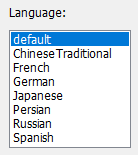
Choose an available localization and restart DE Decompiler so that the selected language is applied consistently across its windows. This manual uses the English interface captions.
Local and online documentation
The English manual is available online and as a PDF. Keep a local copy when working in an isolated analysis environment. The local manual includes the product website and support email in About the developer.
If the selected help translation is unavailable, DE Decompiler falls back to the English PDF or website. When a local PDF or CHM cannot be opened, the corresponding online documentation is used.