
Plugins and the SDK
Use FRX Image Viewer to inspect and extract recovered form graphics, or develop a custom plugin through the shared SDK.
FRX Image Viewer
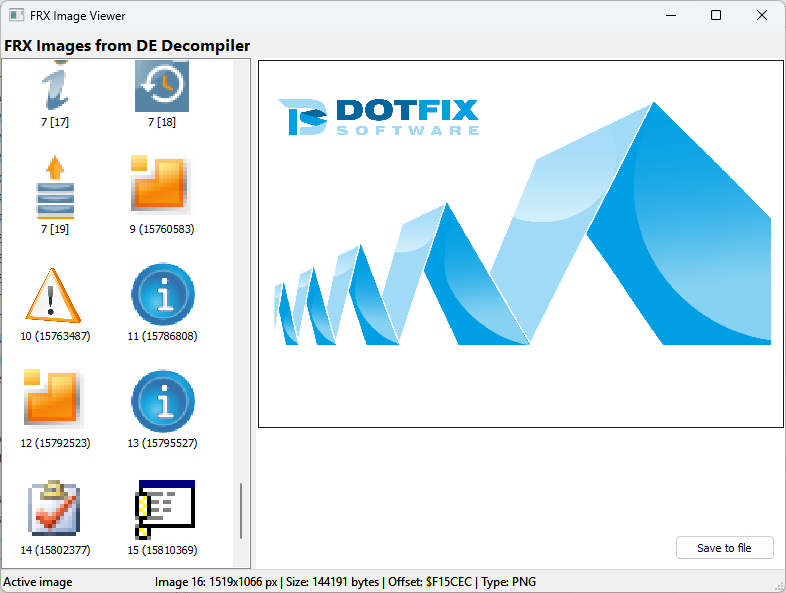
FRX Image Viewer 1.2.0 previews and extracts images registered by VB Decompiler or DE Decompiler. VB Decompiler supplies VB5/6 and .NET form graphics; DE Decompiler supplies binary DFM graphics from supported VCL applications written in Delphi or built with C++Builder. Supported picture formats are BMP, PNG, JPEG, GIF, ICO and CUR.
Installation and opening
- Copy
FRXViewer.dllto the host installation'spluginssubdirectory and restart the decompiler. The DLL architecture must match the host application, regardless of the analyzed file's architecture. - Open the executable or DLL and decode its forms so that the host registers the available images.
- Select Plugins > FRX Image Viewer, then choose a thumbnail to inspect the image.
The 1.2.0 download contains a DLL for an x86 host. Use a matching build for an x64 host. The plugin requires Windows 10/11; its source repository includes build instructions.
Preview and export
The gallery and preview show available images, including compound ICO/CUR files. The status area identifies the selected item, dimensions, size or source-bitmap offset, and format. The viewer follows the host theme and supports dark mode.
Choose Save to file to export the selected item. Standalone pictures retain their original bytes and format. Individual ImageList cells are exported as ICO files with their masks and alpha transparency; these ICO files are derived from the source bitmap sheets.
Native VCL ImageLists and compatibility
With a compatible host, recognized native VCL ImageLists appear as individual icons. Separately encoded pictures in collection items remain separate ordinary images. Unsupported streams retain whole-picture handling where the original image entries are available.
Shared SDK revision 26.6, supported by VB Decompiler 26.6 and DE Decompiler 26.6, adds optional GetFrxImageListInfo (63) and GetProductName (64). Older hosts retain the original picture API and whole-image behavior. See the SDK reference for capability detection and offset rules.
Viewing and extraction do not execute the inspected file or load its components. Animated GIFs display their first frame. The available assets depend on images successfully decoded and registered by the host.
The Plugins menu is the entry point for installed native DLL plugins. The shared callback interface exposes supported project information and code to custom extensions. Available DLL plugins are initialized at startup; build for the intended host architecture and Windows environment.
Developing a plugin
The SDK includes examples for Visual C++, Rust, Delphi and Free Pascal. Use its exported entry points and host callback to implement the operations required by your workflow.
You can also ask an AI coding agent to implement a plugin. Provide the SDK and API reference link and a description of the required behavior, then review, build and test the resulting DLL against DE Decompiler and representative input files.
Compatibility of the interface
Use the documented SDK calling convention, exported entry points and data representations. Shared API identifiers keep their existing names, including the VBDecompilerPlugin prefix; changing the product name in an exported symbol would change the ABI.
Sharing the interface does not make every VB Decompiler plugin suitable for DE Decompiler data. Check the expected object types, recovered code language and operations available for the current selection.
Developer reference
See the Plugin API reference on the product website. It describes exported entry points, command identifiers, callback data and buffer requirements. The SDK provides active-view and project-level code access; operations that search every decompiled procedure need the corresponding listings to be available. Code-query callbacks can process individual procedures when the matching input is available.