
String references
Tools > String references helps locate recognized literals and the procedures associated with them. String-reference browsing is available in Free Lite and commercial editions.
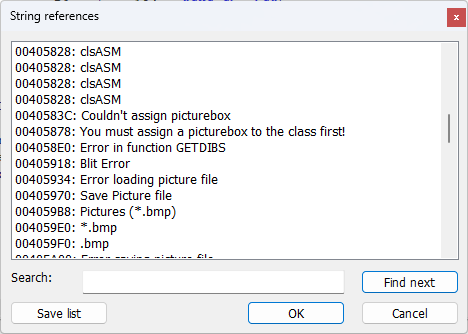
Use Search and Find next to locate an interesting literal. Double-click a string to open a procedure that references it; double-click again to continue finding its uses. OK navigates to the selected string and closes the dialog; Cancel closes the dialog.
The list contains strings collected during disassembly. In Fast decompilation mode, preliminary analysis can supply these references when Analyze prototypes is enabled. If DE Decompiler reports that a full pass is required, disable Fast decompilation and reopen the input. In Lite, selecting a reference opens the native disassembly. Inspect referring procedures and the corresponding bytes to determine how a value is used. Paths, registry-related strings, network addresses and command fragments can help prioritize code review.
A reference is an analysis lead. The presence of a string in a procedure does not establish that it is passed to a particular API or that the relevant branch executes. Encrypted, dynamically constructed or otherwise unrecognized strings can be absent.
Editing a recognized string
Right-click a supported string and select Edit string. The replacement must not be longer than the original string because the file does not reserve space for a larger value. Confirming the edit modifies the file directly; this operation does not create a backup and cannot be undone through the string-edit dialog. Work on a copy and preserve the unmodified sample.
In commercial editions, the context menu also provides HEX Editor for inspecting the string's bytes. The HEX Editor offers undo and redo for its own edits. Check the resulting bytes and affected code after a change.