
Viewing and comparing code
Use reconstructed Delphi-like Pascal statements to understand a procedure, and native disassembly to check how a result was obtained. This workflow applies to supported input from both Delphi and C++Builder.
Following the listing
Select a procedure in the tree. Inspect the signature, local declarations and control flow before following individual expressions. Generated names identify recovered values where an original source name is unavailable. Syntax highlighting and collapsible blocks help navigate longer procedures.
Recovered bodies may be enclosed in Pascal comment wrappers for export. DE Decompiler still treats those bodies as code for identifier highlighting, reference search and renaming. String literals and actual line comments remain excluded from code-reference matches.
Identifiers and code navigation
Place the caret on a register, variable or function name to highlight matching occurrences in the current listing. Highlighting a local or global identifier in one procedure is separate from a project-wide reference search.
Double-click a recognized procedure call to open the called procedure. Address-like constants can lead to the corresponding file bytes in the HEX Editor. Use Esc, the history arrows or mouse Back and Forward buttons to return.
Synchronizing addresses
Switching between Decompiler and Disassembler follows the current caret address, including full Win64 addresses. If there is no identical instruction label, the nearest available address is selected. Only folds containing the destination are opened.
Mixed high-level and native views
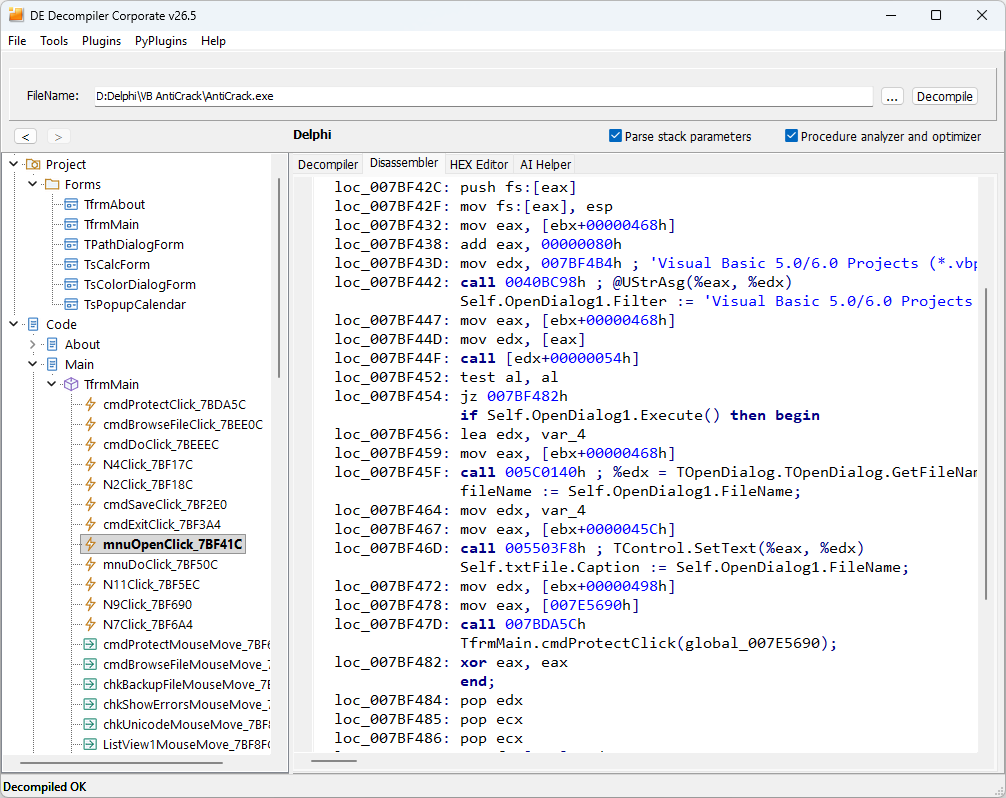
Right-click the code and select Copy to disassembler, or press D in the code view. The resulting view places address-labelled reconstructed statements beside the matching native instructions. Folded source is included without expanding the original editor, and unaddressed declarations are omitted from the annotations. Keep Add Addresses enabled when using address-based comparison.
References and names
Use Find references on a procedure selected in the tree, or press X, to examine recognized callers. Double-click a result to inspect the caller. Reference searches require full processing: disable Fast decompilation and reopen the input if prompted. A reference list based on undecoded cached bodies is incomplete. In the code view, place the caret on a global variable and press X to search for its references. Indirect or dynamically resolved uses may not appear in the recognized-reference list.
Use Rename variable or N to assign a meaningful analysis name. Names follow Pascal identifier rules. Rename matching is case-insensitive and checks collisions with parameters, local declarations and reserved keywords. Undo renaming or Ctrl+Shift+Z reverses a variable rename independently of ordinary text-editing undo. Keep analyst-assigned names distinct from original names preserved in the binary.
Keyboard access
| Focus | Shortcut | Action |
|---|---|---|
| Code | D | Combine the reconstructed listing with disassembly. |
| Code | N | Rename the selected variable. |
| Code | Ctrl+Shift+Z | Undo variable renaming. |
| Code | X | Find references to the global variable under the caret. |
| Tree | X | Find references to the selected procedure. |
| Tree | G | Navigate using a section path. |
| Tree | Ctrl+C | Copy the selected object's full tree path. |
| Tree | Space or Insert | Mark or unmark the selected item. |
| Views | Alt+1 | Switch focus between the tree and active view. |
| History | Esc | Return to the previous procedure. |
Single-letter shortcuts depend on keyboard focus. They do not replace ordinary typing in input fields.