
VCL forms and visual inspection
DE Decompiler decompiles VCL form information and visualizes recovered controls and properties.
The same VCL form inspection and event-navigation workflow is available for applications built with C++Builder.
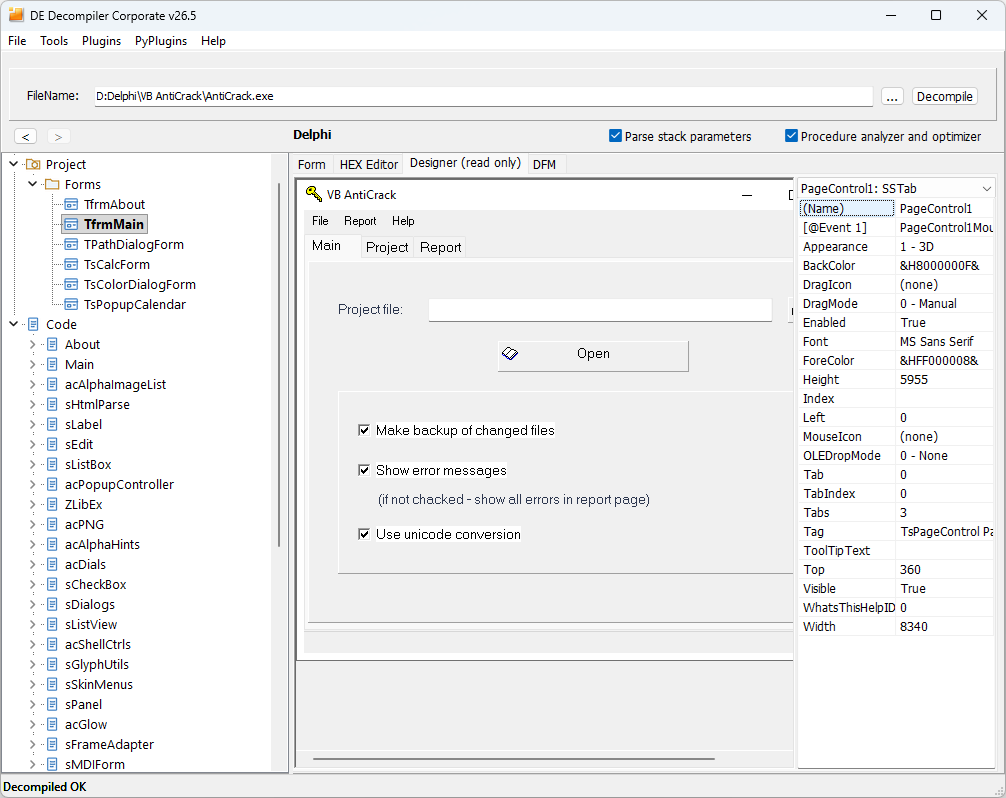
- Expand Forms in the project tree and select the form to examine.
- Open Designer (read only) to inspect the recovered visual layout.
- Select a control and examine its available properties and recovered event entries in the property area.
- Compare the form representation with the available DFM, form-data and HEX views.
Use FRX Image Viewer to preview and export registered form pictures and recognized native ImageList icons.
DFM source and the visual preview
The DFM source view retains recovered component class names, properties and event-handler identifiers. It supports syntax highlighting, matching-identifier highlighting, search and copy. Fold object, inherited and inline blocks, collection items, binary properties and string lists to navigate large forms.
The Form tab contains the converted representation used for the visual preview. Inspect the recovered DFM source for the stored property values and original component class names.
The preview reconstructs saved pages, menus, lists, grid geometry and toolbar buttons, including supported local ImageList graphics, masks and alpha transparency. Supported AlphaSkins controls are mapped to their VCL equivalents for display while their DFM class names remain available in the source. Drawing and event code from the analyzed application is not executed.
Following event handlers
Select a recovered control or menu event in the form view to open its handler. Returning through viewing history restores the selected control, active page and scroll position. Inspect the procedure in Decompiler and compare it with Disassembler when investigating the event behavior.
Form data and offsets
The Show offsets option adds location information to the form-data presentation. Use it when relating a recovered property or definition to its binary representation.
Interpreting the preview
The designer is an inspection view of recovered form data. It is not the original application executing its initialization or event code. Runtime-created controls and values assigned only by code require investigation in the corresponding procedures.
Custom controls and version-specific type recognition can affect how a form is represented. Inspect the recovered data and code when a component, property or layout appears incomplete.
TMS controls and static previews
The visual preview supports recognized TMS labels, buttons, lists, group boxes, sliders, scrollbars and tab strips, using their stored text and layout. Activity indicators have static previews; embedded web areas are marked without loading their pages.