
Finding procedures and text
Procedure-name search and listing-text search serve different purposes.
Find a procedure
Use Tools > Find procedure or Ctrl+T and enter a complete name or a distinguishing part. Matching is case-insensitive and accepts qualified procedure names. Select the required match from the results.
Find displayed text
Use Tools > Find string or Ctrl+F to open text search. With In active window selected, the search applies to the current code or form-data view. Clear this checkbox to search the decompiled project. Enter the text in String, then use Find and Find next to move through matches.
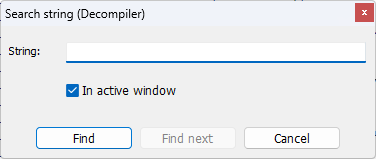
Whole-project high-level text search requires the corresponding procedures to be decompiled. Disable Fast decompilation and process the file again when you need complete coverage for high-level text search.
Text search includes folded content in the Decompiler, Disassembler, DFM source and AI views. A found match is revealed while unrelated folds remain closed.
String literals
Use String references to investigate recognized string literals and their locations. These references can be collected by preliminary disassembly in Fast decompilation mode; they do not require every procedure to have a complete high-level listing.