
The main window
The project tree connects recovered forms, units, classes and procedures with the code, declaration and binary views.
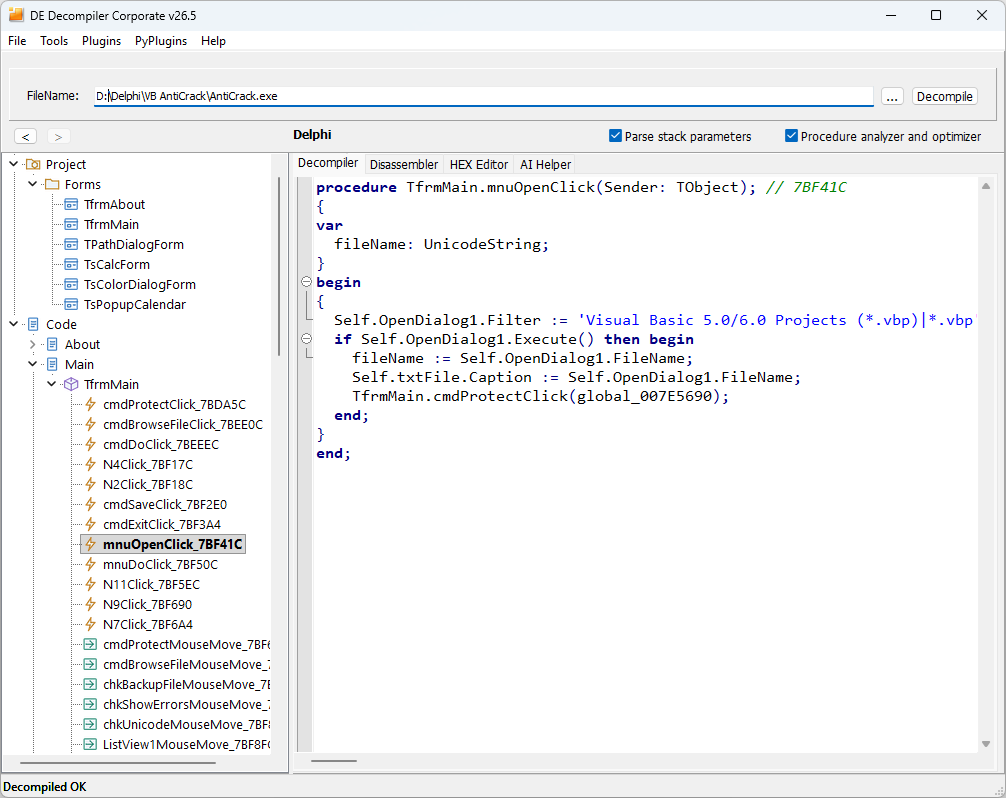
The project tree
Forms contains recovered form objects. Code is grouped as Unit > Class > Procedure. Units and classes remain collapsed until opened; expanding a unit with one visible class also reveals that class's procedures. Selecting a unit displays its reconstructed declarations; selecting a procedure opens the corresponding code views.
Views and processing controls
- Decompiler displays reconstructed high-level statements.
- Disassembler displays native instructions and addresses.
- HEX Editor displays the underlying file bytes.
- Designer (read only) displays a recovered VCL form and its available properties.
- DFM displays the recovered DFM source, with syntax highlighting, folding, search and copy.
- AI Helper processes an existing decompiled listing with a selected model or API service.
Parse stack parameters and Procedure analyzer and optimizer affect reconstruction of the current listing. When output is unclear, compare it with these processing options disabled and inspect the corresponding disassembly. With cached or fully processed output, process the file again after changing a setting.
Navigation
The arrow buttons above the tree move through viewing history. Esc and the mouse Back and Forward buttons navigate the same history across code, declarations, form previews and source views. Returning to a form restores its selected control, page and scrolling; returning to code restores the caret and view position. Alt+1 switches focus between the tree and the active view, and Enter opens the selected tree item. In the HEX Editor, Tab moves between the hexadecimal and text fields and then to the next control.
Window style as in Visual Studio places the code on the left and the project tree on the right. The available tabs depend on the selected object. See Viewing and comparing code for context-sensitive shortcuts.